The Stock Market Intelligence Layer for LLMs
An elite Model Context Protocol (MCP) server equipping your AI agents (Claude, Cursor, Manus, and more) with 28 advanced market tools, live global data, and a Python execution sandbox.
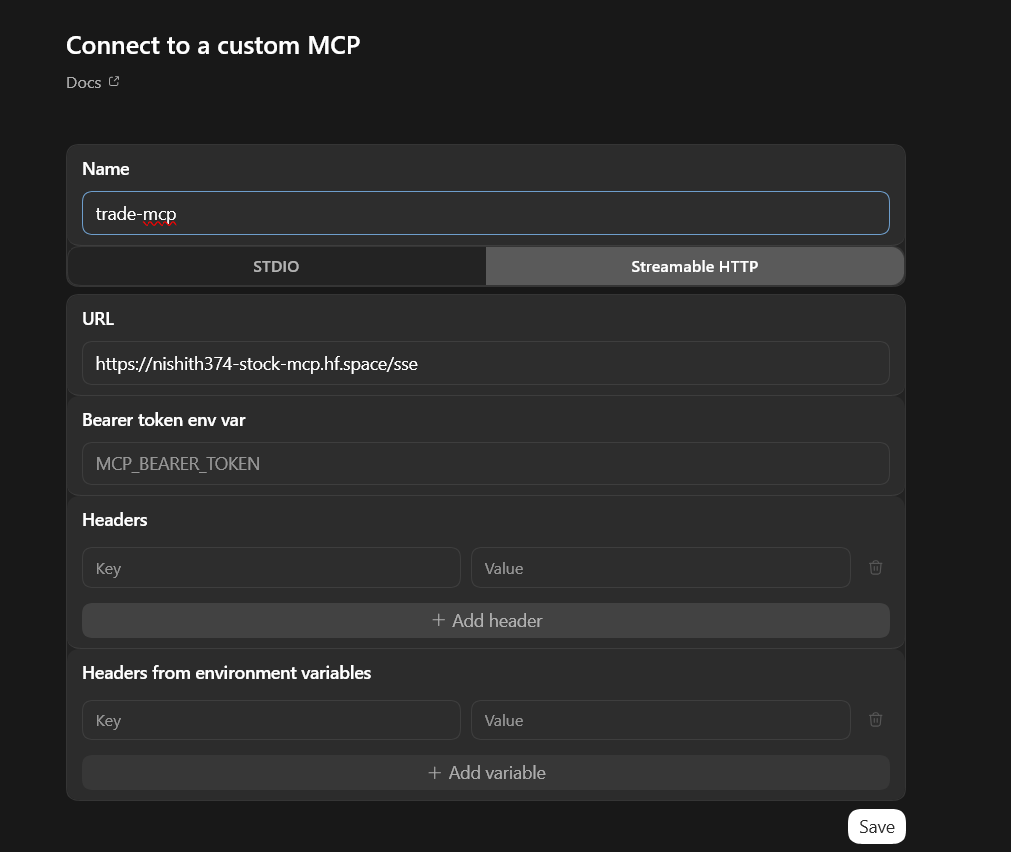
https://nishith374-stock-mcp.hf.space/sse
See trade-mcp in Action
Select a preset below to see how Claude uses our tools in real-time to answer complex financial queries.
28 Tools Across 7 Modules
An extensive suite of stock market intelligence pipelines compiled into clean, lightning-fast tools.
Live & Historical Market Data
Fetch worldwide stock prices (including US and Indian exchanges) with real-time quote updates, historical OHLCV data spanning multiple decades, and instant symbol search queries.
Indian Market Specialized
Deep integration with official NSE endpoints, returning options chain data, circuit limits, VWAP, corporate actions feeds, and automated unzipping/parsing of NSE Bhavcopy archives in-memory.
Python Data-Science Sandbox
Allows LLMs to dynamically generate and run Python analysis scripts on local directories. Supports mathematical analysis and chart generation using `pandas`, `numpy`, and `matplotlib`.
Fundamentals & Financials
Income statements, balance sheets, cash flows, and key earnings metrics (Beta, P/E ratio, market cap, consensus EPS projections).
AI Market Intelligence
Leverages Groq (LLaMA 3.3) and NVIDIA NIM APIs to perform stock sentiment analysis, automated trade signal generation, news digests, and portfolio audits.
Global News & Indicators
Pulls real-time financial news feeds alongside technical indicators like RSI, MACD, Bollinger Bands, and Sector performance.
Connect in 60 Seconds
Instantly register the server with your local LLM editor or desktop client using our remote SSE connection.
Loading...Loading instructions...